 Titpea
Hold to see
Point at a paragraph; its translation floats beside it.
Bilingual · Chrome extension
The original by default. Hold a key for a paragraph’s translation. Double-tap for both.
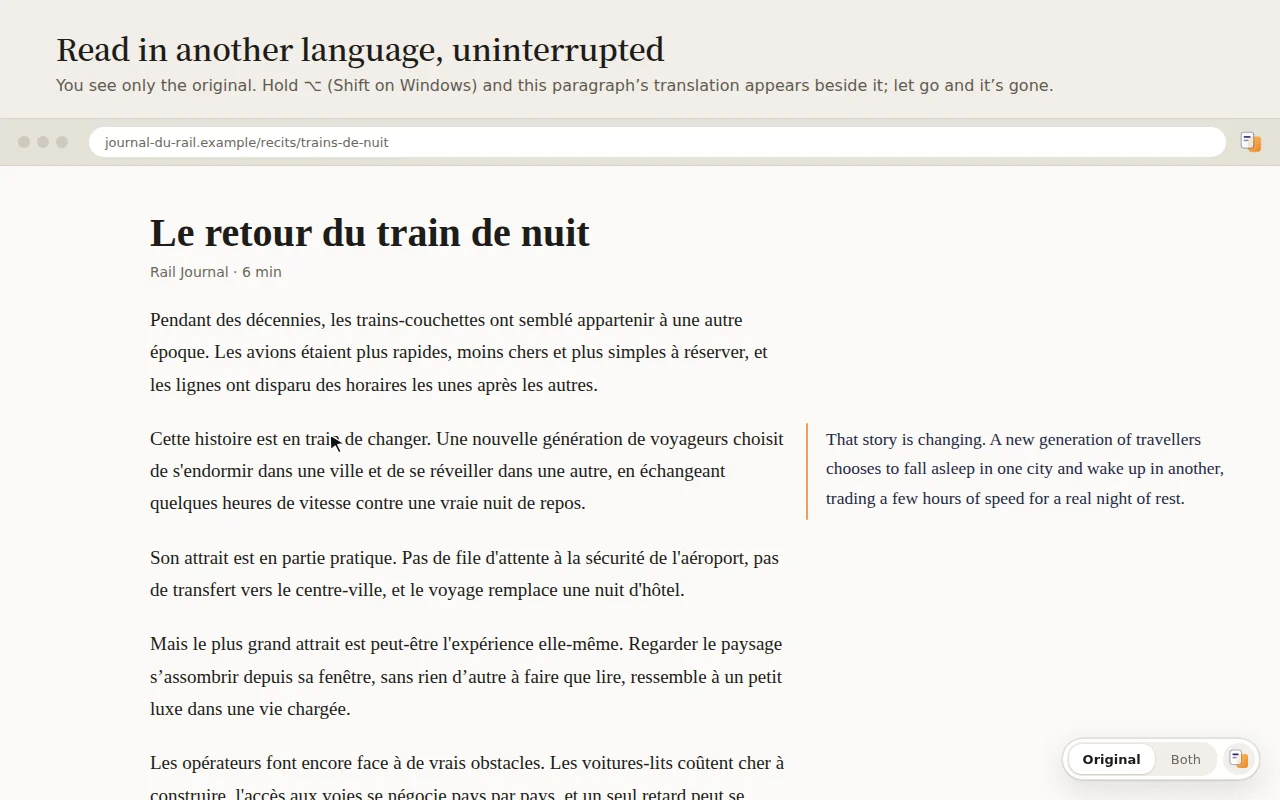
Point at a paragraph; its translation floats beside it.
In the margin when there is room, otherwise below each paragraph.
X, Reddit, GitHub, Hacker News, Wikipedia: content only, no buttons.
Point at a sentence; its counterpart lights up.
Hold the key and rest on a word to see its meaning.
Where on-device translation lacks a pair, switch to Precise.
Desktop Chrome 138 or later. The first use downloads Chrome’s on-device language model.
⌥ on Mac, Shift on other systems. You can also assign a shortcut for switching modes at chrome://extensions/shortcuts.
Chinese (Simplified and Traditional), Japanese, Korean, English, French, German, Spanish, Portuguese, Russian, Italian, and 27 more. It defaults to your browser’s language, or English when that is not on the list.
Yes. On-device translation is free, with no account or subscription. Precise translation uses your own API key, so the provider bills you for it.
Bilingual